

How Should You Demonstrate a Compressed Sofa Before a Customer Places an Order?
Show the exact model, guide a useful sit test, demonstrate one confirmed layout, explain the real cartons and record the final configuration before the customer orders.


A recovery video can attract attention, but it does not tell a customer which configuration they are sitting on, which modules can be changed, what will arrive in the cartons or what the final order includes. A useful showroom demonstration closes those gaps in one repeatable sequence.
Build the demonstration around one confirmed product version. The recovered display, module identities, connector demonstration, packing reference and order sheet must all describe the same sellable configuration. If the retailer cannot prove that link, the demonstration should stop at explanation rather than make a delivery promise.
What should a compressed-sofa showroom demonstration prove?
The demonstration should prove five things in order: what the displayed product is, how it feels for the intended customer, which approved layouts can be built, how that exact version is packed and what the customer is actually ordering. Each step answers a different risk; none is replaced by a dramatic unpacking clip.
Begin with an identity card beside the sofa. Show the model, revision, fabric and color, displayed module list and the options fitted to the sample. Mark anything that is display-only, optional or unavailable in the target market so the customer does not assume every visible feature is included.
End with the same identities on the order record. The value of the demonstration is not the number of features shown; it is the customer being able to connect the experience in the showroom to one unambiguous sellable set.
| Stage | What the customer sees | What the salesperson proves |
|---|---|---|
| Identify | Model, upholstery and displayed module list | The sample is the named sellable version |
| Sit test | Guided upright, relaxed and standing movements | The customer can describe fit and support |
| Reconfigure | One approved layout change | The modules and joining sides are confirmed |
| Transport | Real carton or approved packing sheet | Packing data belongs to the same version |
| Confirm | Completed configuration record | The order matches the demonstrated set |
Practice source note. Public shopping guidance consistently treats in-store touch and trial as different from online viewing. This article turns that observation into a proof sequence for a compressed-sofa display. Practice sources 01, 05, 07 and 09.
How should the salesperson run a useful sofa sit test?
Invite the customer to use the sofa in the positions that matter to them: upright conversation, relaxed sitting, leaning into the corner and standing up. Ask about their height range, preferred support, usual posture and whether children, older users or pets change the requirement. A quick sit without context produces a reaction, not a usable buying record.
Keep the assessment descriptive. Record whether the feet are supported, whether the seat feels too deep or shallow, where the back support lands and whether the customer can rise comfortably. Do not translate one person's impression into a universal comfort claim or a material-performance claim.
If another configuration changes the arm position, corner depth or seat width, repeat the relevant part of the sit test after reconfiguration. The salesperson should explain which difference comes from the module layout and which comes from upholstery, cushion or optional accessories.

| Prompt | Record |
|---|---|
| Sit upright | Foot support, seat depth and back contact |
| Relax or lean | Corner access, cushion support and usable width |
| Stand up | Seat height, arm support and effort |
| Change layout | What changes because of module position |
Practice source note. Consumer guidance recommends changing posture and checking seat depth, height, support and the ability to rise. Use those prompts to structure questions, not to publish universal comfort dimensions. Practice sources 03, 05, 06 and 08.
How do you demonstrate modular layouts without implying every combination is available?
Choose one meaningful layout change that uses confirmed modules—for example, moving an ottoman, changing a return side or separating a chair module. Identify every piece before moving it, show the connector and joining side, and rebuild the approved final footprint.
Keep a layout card for each configuration the store is allowed to sell. The card should show the module codes, left or right orientation, final dimensions and any connector or gap condition that must be checked. A visually possible arrangement is not automatically an orderable arrangement.
If the customer asks for a new combination, treat it as a configuration request. Mark it pending until the supplier confirms module compatibility, dimensions, upholstery continuity, packing and commercial conditions for that exact set.


Practice source note. Public modular-furniture material emphasizes moving, extending or reducing layouts, while customer reports show that the exact in-store and delivered configuration can diverge. Keep sellable combinations tied to confirmed module identities. Practice sources 02 and 04.
How should a real carton explain compressed delivery?
Place one real carton, approved mock-up or packing sheet beside the recovered display. Use it to explain carton count, packed dimensions, gross weight, module identity and the delivery path the customer must plan. All figures must come from the same model and revision as the sofa being demonstrated.
Show what the carton does not prove. A compact package does not by itself prove that it fits every lift, stair or doorway, and a recovered display does not prove that every home will achieve the same timing or appearance under different conditions. Ask the customer to verify the actual route and follow the model-specific handling and recovery instructions.
For multi-carton sets, map each carton to its module and tell the customer whether parcels may be tracked or delivered separately. The order record should preserve the expected carton count so receiving teams can identify a partial delivery before assembly starts.
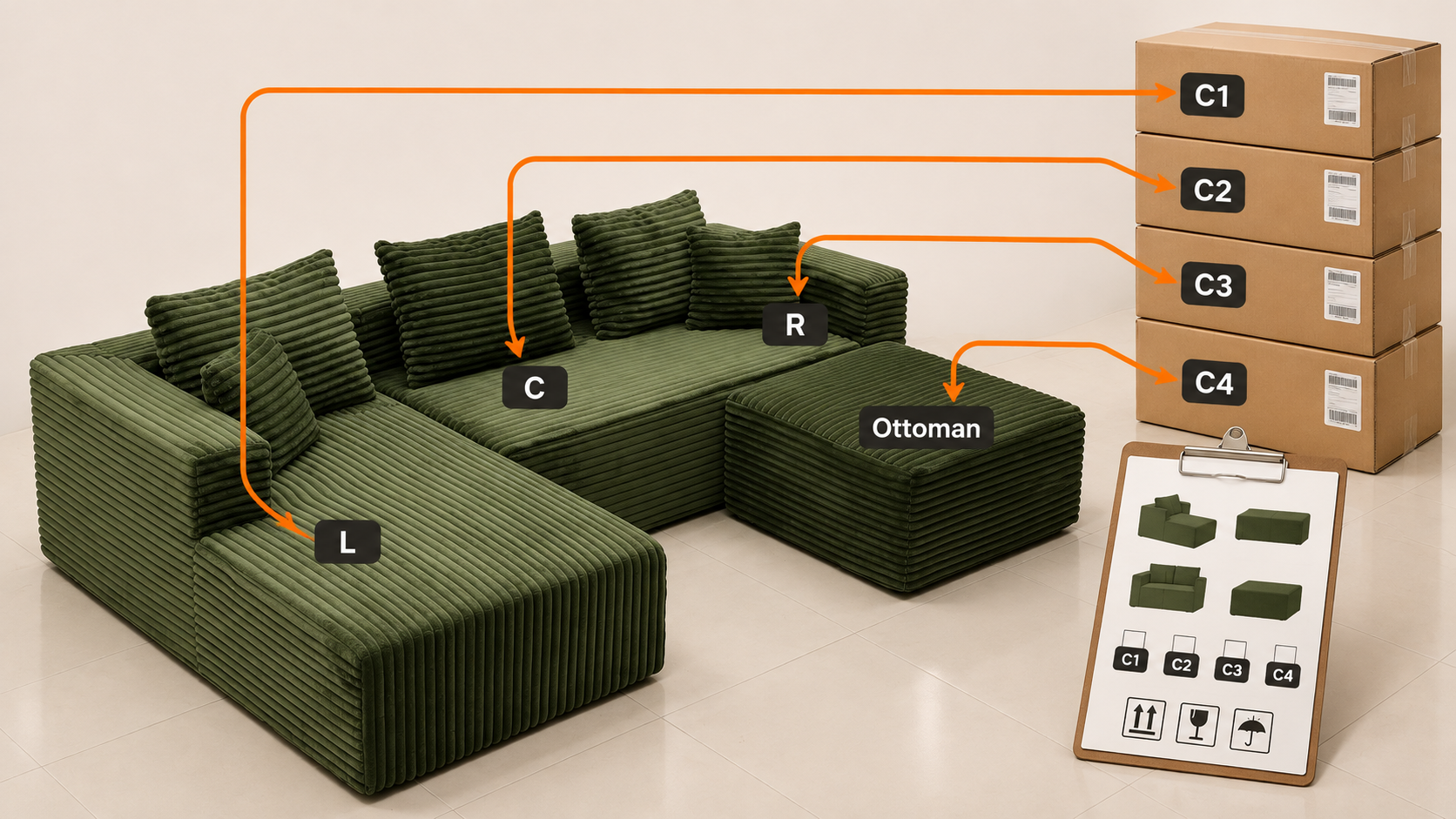
Practice source note. Social discussions repeatedly advise checking access dimensions and delivery conditions. The carton-to-module map is an editorial purchasing control; the public sources do not verify any Yongform packing figure. Practice sources 04, 06 and 08.
When should recovery footage be shown, and what must it not claim?
Show recovery footage after the customer has seen the exact displayed configuration and packing reference. The footage should identify the model, revision, elapsed-time context and required steps. A generic clip is useful for explaining the process but cannot confirm the result for another construction or version.
Use the video to explain preparation, opening, positioning and follow-up checks. Do not use it to promise a universal recovery time, eliminate the need for instructions or conceal differences between a production sample and the retail configuration.
Where possible, pair the video with the recovered showroom sample and its dated recovery record. The salesperson can then distinguish what was observed on that sample from what the supplier formally specifies for the product.

Practice source note. Experience-led content is useful for showing process, but public posts and screens can omit version, timing and conditions. Keep recovery footage linked to one identified sample and its instructions. Practice sources 04, 07 and 10.
How do you move from the demonstration to an order-ready configuration?
Rebuild the customer's chosen configuration on one order sheet. List every module, joining side, fabric and color, optional accessory, quantity and destination. Attach the approved layout and the carton references that belong to the same version.
Read back the inclusions and exclusions. Clarify whether cushions, connectors, covers, legs or tools are packed with a specific module or supplied separately, and whether the selected layout changes price, minimum quantity or lead-time basis. Keep any unconfirmed point visibly pending.
The final question is not whether the customer liked the demonstration. It is whether sales, purchasing, the factory, warehouse and customer would all build the same sofa from the released record.
| Record item | Required detail |
|---|---|
| Product identity | Model, revision, upholstery code and color |
| Layout | Module codes, directions, joining sides and final dimensions |
| Packing | Carton IDs, count, dimensions, weight and handling notes |
| Commercial scope | Quantity, destination, price basis, MOQ and lead-time basis |
| Status | Confirmed, excluded or visibly pending |
Practice source note. Retail guidance highlights the need to align in-store experience, follow-up information and ordering. The released configuration record prevents a persuasive demonstration from turning into an ambiguous order. Practice sources 01, 09 and 10.
What should the retailer record before training the sales team?
Release a short demonstration standard with the approved sequence, model identities, layout cards, sit-test prompts, carton evidence, recovery media and escalation route. Give each item an owner and revision so an old video or carton sheet cannot quietly outlive the product version it describes.
Run the script with a salesperson who was not involved in development. Ask them to identify the display, perform the module change, explain the packing and complete a sample order. Any point they cannot prove should be corrected in the material or routed back to the supplier.
Review the demonstration after product changes and after real customer questions. Update the script when a configuration, fabric, connector, packing method or commercial condition changes; do not rely on staff memory to reconcile different versions.
Practice source note. Industry material describes scene-based retail, consistent sales guidance and cross-channel follow-up. Use that as a reason to control the script and escalation path, not as proof of a particular conversion result. Practice sources 09 and 10.
What should you send the factory before building the showroom script?
Send the display model and revision, intended configurations, upholstery choice, target market, carton references and every claim the sales team plans to make. Ask the supplier to mark each item confirmed, excluded or pending for that version.
Download the demonstration checklistPut it into practice with Yongform